---
title: "Fleets"
description: "Group devices into fleets, independent of physical location."
icon: "layer-group"
---
> **For AI agents:** the complete documentation index is at [llms.txt](/llms.txt). Append `.md` to any page URL for its markdown version.
A **Fleet** is a group of devices that aren't tied to one location: a set of vehicles,
swappable batteries, or any devices you want to track together. Like a Site, a Fleet is a
kind of [Place](/platform/core-concepts#places), so a device always belongs to exactly one
Place.
 ## Fleet vs Site
Both are Places, but they model different things.
| | Fleet | Site |
|---|---|---|
| Models | A logical group (e.g. vehicles) | A physical location |
| Location | Optional coordinates | Required address and coordinates |
| Internal structure | None | Levels and level groups |
| Devices | No level assignment | Can be placed at a level |
## What it does
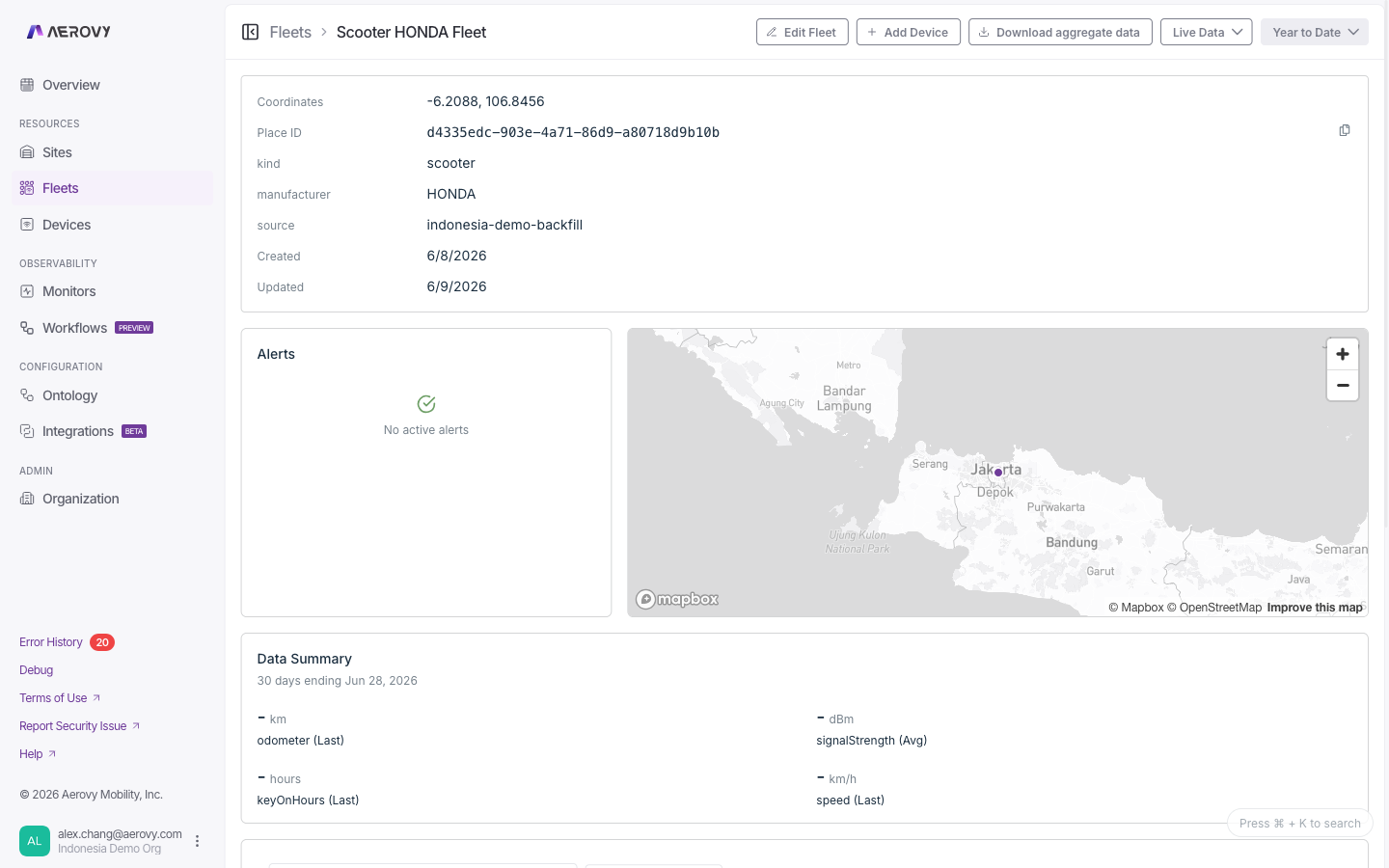
You can see all the fleets in your organization and open any one to view its details: its
metadata, alerts, members, and device metrics. From a fleet you add devices, manage monitors,
edit or delete the fleet, and download aggregate data over a time range.
## Configuration
### Fleet fields
Used when creating or editing a fleet.
| Field | Type | Required | Notes |
|-------|------|----------|-------|
| Fleet name | string | Yes | Must be non-empty |
| Latitude | number | No | `-90` to `90`. Set with longitude, or leave both blank |
| Longitude | number | No | `-180` to `180`. Set with latitude, or leave both blank |
| Attributes | key/value pairs | No | Free-form metadata; each pair needs a name and a value |
| Displayed metrics | ordered list of metric ids | No | Metrics shown on the fleet dashboard |
### Adding devices
A device joins a fleet by being assigned to it as its Place. There's no separate membership
list: a device's fleet is just its `placeId`. Devices in a fleet have no level (levels are a
Site concept). Add a device from the fleet's detail page.
### Finding fleets
Search matches a fleet's name or id. On a fleet, you can search its devices by name, type, or
description, and filter by type.
## States
### Alerts
The alerts panel shows only unhealthy alerts (those whose condition is currently met),
de-duplicated per monitor and condition. See [Monitors](/console/monitors) for the alert and
monitor state values.
### Deleting a fleet
Deleting first checks for dependent resources. If any exist, you confirm a **force delete**
that also removes them.
## API
Send your API key in the `X-Api-Key` header. A `read` scope covers reads; `write` covers
create, update, and delete. A fleet id is a plain GUID, with no prefix.
| Method | Path | Purpose | Scope |
|--------|------|---------|-------|
| `GET` | `/v2/fleets` | List fleets (paginated) | `read` |
| `GET` | `/v2/fleets/{placeId}` | Get one fleet | `read` |
| `POST` | `/v2/fleets` | Create a fleet | `write` |
| `PUT` | `/v2/fleets/{placeId}` | Update name, location, attributes, displayed metrics | `write` |
| `DELETE` | `/v2/fleets/{placeId}` | Soft-delete a fleet | `write` |
Force delete and delete-preview for fleets are **coming soon** to the v2 API.
Devices are managed through the Place-scoped Thing endpoints (see [Devices](/console/devices)):
`GET /v2/fleets/{placeId}/things` to list, `POST /v2/fleets/{placeId}/things` to add.
## Fleet vs Site
Both are Places, but they model different things.
| | Fleet | Site |
|---|---|---|
| Models | A logical group (e.g. vehicles) | A physical location |
| Location | Optional coordinates | Required address and coordinates |
| Internal structure | None | Levels and level groups |
| Devices | No level assignment | Can be placed at a level |
## What it does
You can see all the fleets in your organization and open any one to view its details: its
metadata, alerts, members, and device metrics. From a fleet you add devices, manage monitors,
edit or delete the fleet, and download aggregate data over a time range.
## Configuration
### Fleet fields
Used when creating or editing a fleet.
| Field | Type | Required | Notes |
|-------|------|----------|-------|
| Fleet name | string | Yes | Must be non-empty |
| Latitude | number | No | `-90` to `90`. Set with longitude, or leave both blank |
| Longitude | number | No | `-180` to `180`. Set with latitude, or leave both blank |
| Attributes | key/value pairs | No | Free-form metadata; each pair needs a name and a value |
| Displayed metrics | ordered list of metric ids | No | Metrics shown on the fleet dashboard |
### Adding devices
A device joins a fleet by being assigned to it as its Place. There's no separate membership
list: a device's fleet is just its `placeId`. Devices in a fleet have no level (levels are a
Site concept). Add a device from the fleet's detail page.
### Finding fleets
Search matches a fleet's name or id. On a fleet, you can search its devices by name, type, or
description, and filter by type.
## States
### Alerts
The alerts panel shows only unhealthy alerts (those whose condition is currently met),
de-duplicated per monitor and condition. See [Monitors](/console/monitors) for the alert and
monitor state values.
### Deleting a fleet
Deleting first checks for dependent resources. If any exist, you confirm a **force delete**
that also removes them.
## API
Send your API key in the `X-Api-Key` header. A `read` scope covers reads; `write` covers
create, update, and delete. A fleet id is a plain GUID, with no prefix.
| Method | Path | Purpose | Scope |
|--------|------|---------|-------|
| `GET` | `/v2/fleets` | List fleets (paginated) | `read` |
| `GET` | `/v2/fleets/{placeId}` | Get one fleet | `read` |
| `POST` | `/v2/fleets` | Create a fleet | `write` |
| `PUT` | `/v2/fleets/{placeId}` | Update name, location, attributes, displayed metrics | `write` |
| `DELETE` | `/v2/fleets/{placeId}` | Soft-delete a fleet | `write` |
Force delete and delete-preview for fleets are **coming soon** to the v2 API.
Devices are managed through the Place-scoped Thing endpoints (see [Devices](/console/devices)):
`GET /v2/fleets/{placeId}/things` to list, `POST /v2/fleets/{placeId}/things` to add.