---
title: "Integrations"
description: "Connect external systems to pull data in or push notifications out."
icon: "plug"
---
> **For AI agents:** the complete documentation index is at [llms.txt](/llms.txt). Append `.md` to any page URL for its markdown version.
Integrations are in **beta**.
An [Integration](/platform/core-concepts#integrations) connects an external system to the
platform. It either pulls data in (so telemetry arrives without you posting it) or pushes
notifications out. You configure an integration once, map its external resources to your
Places and devices, and the platform handles the data flow.
The list page shows the integrations in use and lets you filter and add one. Adding an
integration is a two-step wizard: pick a type from the catalog, then configure it. An
integration's detail page lets you edit its name and properties, manage resource mappings, and
run actions like a test send or a backfill.
## Integration types
An integration is classified along three axes.
### Direction
| Direction | Meaning | Examples |
|-----------|---------|----------|
| `INGRESS` | Inbound: pull external data in | Utility data, weather, telematics |
| `EGRESS` | Outbound: push notifications out | Webhook, email, SMS, phone |
### Type
The type is the specific provider or protocol (for example a utility-data provider, a weather
source, or `WEBHOOK`). The catalog lists the types available to your organization. The full
list of providers grows over time and is documented separately.
### Standard vs custom
Some integrations are **custom** (first-party) and only appear once your organization is
enabled for them. The catalog groups these in a "Custom Integrations" section. Types that
aren't yet available render as **Disabled**, with a prompt to contact your Aerovy
representative to enable them.
## Configuration
The create wizard has two steps.
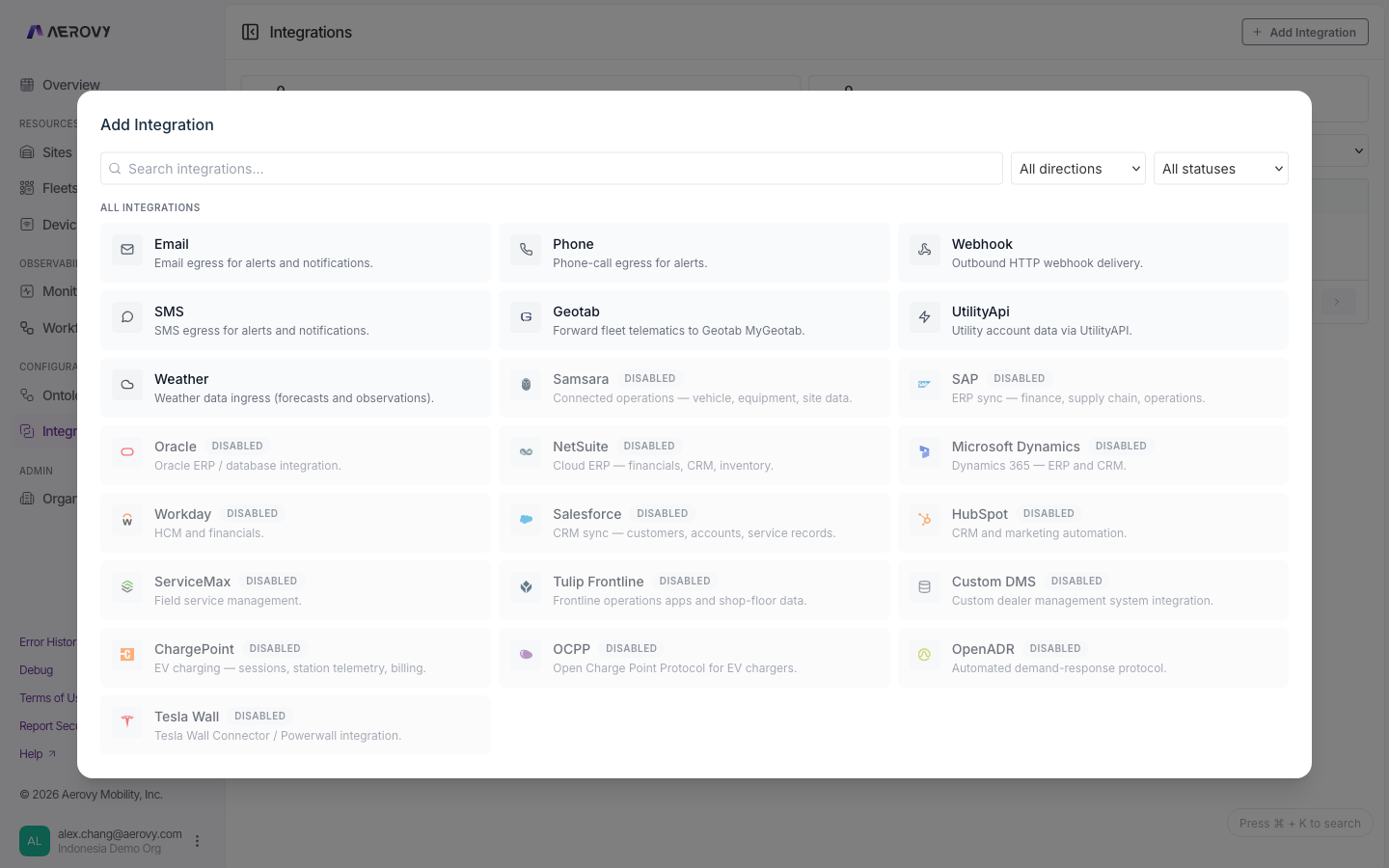 1. **Choose a type.** Search and filter the catalog by direction and availability, then select
a type. The direction follows from the type.
2. **Configure.** Fill in:
| Field | Notes |
|-------|-------|
| Integration name | Required |
| Type-specific properties | Each property declares whether it's required and editable; some map to a resource (a device or Place) |
| Resource paths | Tie external resources to your Things and Places; validated as you add them |
| Metadata | Free-form key/value pairs |
**Outbound specifics:**
- Webhook integrations support an auth type: `NONE`, `BASIC`, or `DIGEST`. Basic and digest
take a username and password, stored as secrets.
- Email, SMS, and phone integrations take recipient lists. Phone numbers are verified by SMS
before they're added.
On the detail page you also manage **resource mappings**: links between an external id and a
platform resource (a Place or a device of a given type).
## States
An integration has **no connection or sync status**. It isn't "connected" or "disconnected":
it exists with its properties and resource mappings. The states you'll see are configuration
and UI states.
### Configuration values
- **Direction:** `INGRESS`, `EGRESS`
- **Webhook auth:** `NONE`, `BASIC`, `DIGEST`
- **Catalog availability:** available, or disabled (coming soon)
### Actions
Running an action (test send, backfill, and similar) is accepted asynchronously: the API
returns `202 Accepted`. Available actions depend on the integration's direction and type.
## API
Send your API key in the `X-Api-Key` header. Reads need a `read` scope; create, update,
delete, and actions need `write`. An integration id uses the `int_` prefix.
| Method | Path | Purpose |
|--------|------|---------|
| `GET` | `/v2/integrations` | List integrations |
| `GET` | `/v2/integrations/{integrationId}` | Get one integration |
| `POST` | `/v2/integrations` | Create an integration |
| `PUT` | `/v2/integrations/{integrationId}` | Update name, properties, metadata |
| `DELETE` | `/v2/integrations/{integrationId}` | Delete an integration |
| `GET` | `/v2/integrations/mapping` | Supported types per direction |
| `GET` | `/v2/integrations/properties` | Property config for a type |
| `GET` | `/v2/integrations/validate-path` | Validate a resource path |
| `GET` | `/v2/integrations/resources` | List resources for a path |
| `GET` | `/v2/integrations/{integrationId}/resource-mappings` | List resource mappings |
| `POST` | `/v2/integrations/resource-mappings` | Create a resource mapping |
Running integration actions (test send, backfill, and similar) over the API is **coming soon** to the v2 API.
1. **Choose a type.** Search and filter the catalog by direction and availability, then select
a type. The direction follows from the type.
2. **Configure.** Fill in:
| Field | Notes |
|-------|-------|
| Integration name | Required |
| Type-specific properties | Each property declares whether it's required and editable; some map to a resource (a device or Place) |
| Resource paths | Tie external resources to your Things and Places; validated as you add them |
| Metadata | Free-form key/value pairs |
**Outbound specifics:**
- Webhook integrations support an auth type: `NONE`, `BASIC`, or `DIGEST`. Basic and digest
take a username and password, stored as secrets.
- Email, SMS, and phone integrations take recipient lists. Phone numbers are verified by SMS
before they're added.
On the detail page you also manage **resource mappings**: links between an external id and a
platform resource (a Place or a device of a given type).
## States
An integration has **no connection or sync status**. It isn't "connected" or "disconnected":
it exists with its properties and resource mappings. The states you'll see are configuration
and UI states.
### Configuration values
- **Direction:** `INGRESS`, `EGRESS`
- **Webhook auth:** `NONE`, `BASIC`, `DIGEST`
- **Catalog availability:** available, or disabled (coming soon)
### Actions
Running an action (test send, backfill, and similar) is accepted asynchronously: the API
returns `202 Accepted`. Available actions depend on the integration's direction and type.
## API
Send your API key in the `X-Api-Key` header. Reads need a `read` scope; create, update,
delete, and actions need `write`. An integration id uses the `int_` prefix.
| Method | Path | Purpose |
|--------|------|---------|
| `GET` | `/v2/integrations` | List integrations |
| `GET` | `/v2/integrations/{integrationId}` | Get one integration |
| `POST` | `/v2/integrations` | Create an integration |
| `PUT` | `/v2/integrations/{integrationId}` | Update name, properties, metadata |
| `DELETE` | `/v2/integrations/{integrationId}` | Delete an integration |
| `GET` | `/v2/integrations/mapping` | Supported types per direction |
| `GET` | `/v2/integrations/properties` | Property config for a type |
| `GET` | `/v2/integrations/validate-path` | Validate a resource path |
| `GET` | `/v2/integrations/resources` | List resources for a path |
| `GET` | `/v2/integrations/{integrationId}/resource-mappings` | List resource mappings |
| `POST` | `/v2/integrations/resource-mappings` | Create a resource mapping |
Running integration actions (test send, backfill, and similar) over the API is **coming soon** to the v2 API.