
API keys
Create, scope, and revoke the keys that authenticate API requests.
The API Keys page manages the keys your organization uses to call the API. From here you create and revoke keys, scope them, set expiration and allowed IPs, and view per-key and org-wide usage. A key's secret is shown once, at creation, and never again.
This page covers configuring keys in the console. For how a key authenticates a request, and how scopes work, see Authenticating with API keys and Resource filters.
The page appears only after your organization is bootstrapped for API keys: a one-time setup that provisions the key-signing infrastructure.
Creating a key
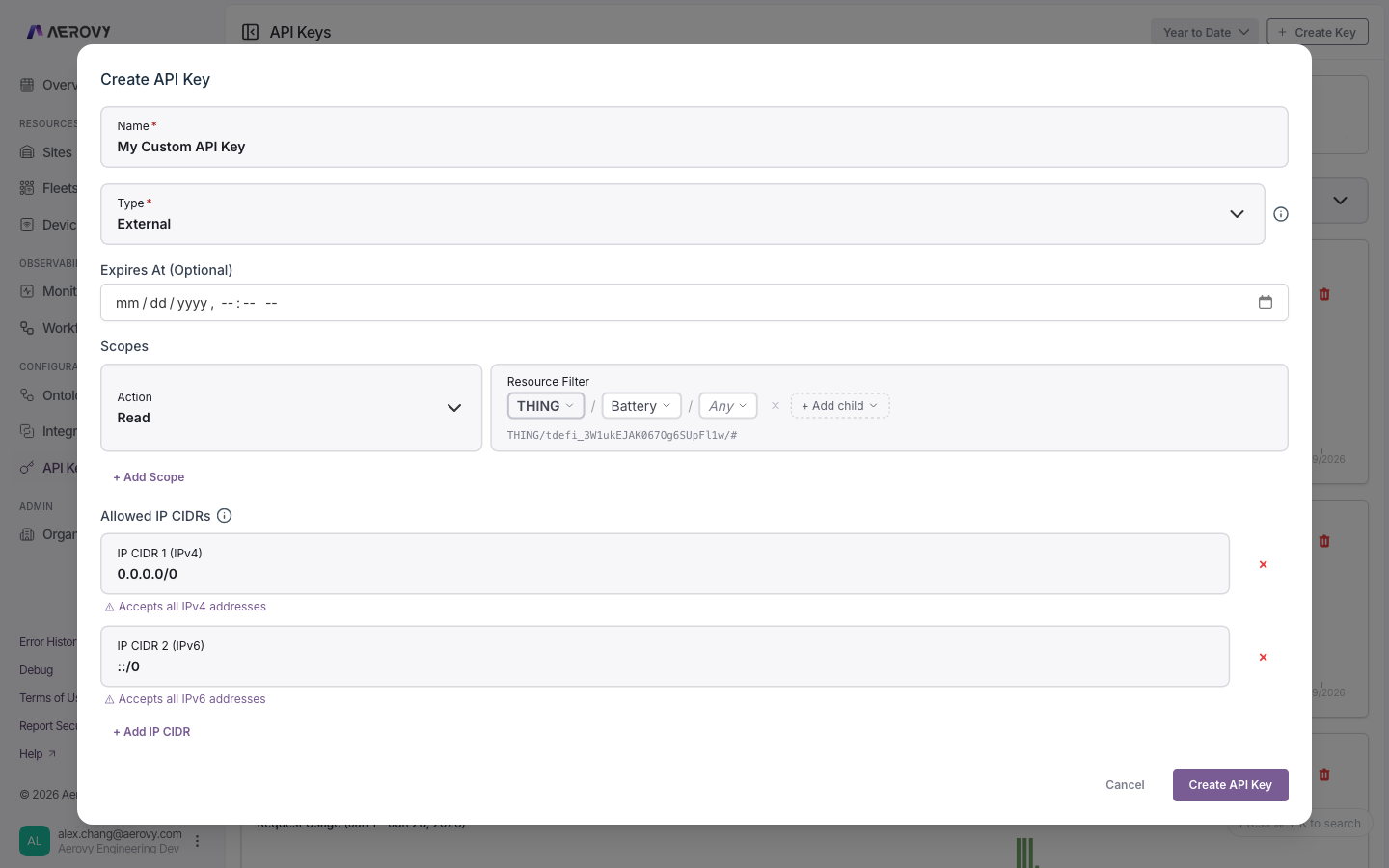
| Field | Type | Required | Notes |
|---|---|---|---|
| Name | string | Yes | Label for the key |
| Expires at | date-time | No | Leave blank for no expiry |
| Scopes | list | Yes | One or more action + resource filter pairs |
| Allowed IP CIDRs | list | No | Defaults to allow-all (0.0.0.0/0 and ::/0) |
Scopes
Each scope is an action plus a resource filter.
| Action | Meaning |
|---|---|
read | Read access |
write | Create, update, delete |
admin | Administrative actions |
* | Any action |
The resource filter limits which resources the action applies to. Clear it to mean all
resources (*). See Resource filters for the path syntax.
Allowed IPs
Restrict a key to specific networks with CIDR ranges. IPv4 and IPv6 rules are matched
independently. A wildcard range (0.0.0.0/0 or ::/0) accepts all addresses of that
version, which the form flags with a warning.
States
Key status
| Status | Meaning |
|---|---|
Active | Usable |
Expired | Past its expiration |
Revoked | Permanently disabled |
Filter the list by status (default: Active), and search by name.
One-time secret
After you create a key, its secret value is shown once. You must acknowledge that you've copied it before continuing. The secret is never retrievable again. If you lose it, revoke the key and create a new one.
Editing and revoking
- Editing scopes or allowed IPs can immediately break calls made with that key. The form warns before you save.
- Revoking a key is permanent. To remove a key, revoke it.
Coming soon: short-lived access tokens
We're adding the ability to exchange your API key for a short-lived access token — a more secure way to authenticate your API requests.
Instead of sending your API key on every call, you'll send it once to a token endpoint, receive
a token valid for a few minutes, and use that token as a Bearer credential. Your long-lived
key stays in one place, and any token that leaks expires almost immediately.
How it will work
- Get a token —
POST /oauth/tokenwith your API key. - Call the API — send the token as
Authorization: Bearer <token>. - Renew — request a new token when the current one expires (about every 10 minutes).
Because this follows the standard OAuth 2.0 client-credentials flow, existing OAuth client libraries will work without custom code. Your current API-key authentication will continue to work unchanged — adopting tokens will be optional.